![logo 324x70.png]](https://expertise.dovideqmedical.com/hs-fs/hubfs/Dovideq/Company/Website/logo%20324x70.png?height=40&name=logo%20324x70.png)
LightControl needs an internet connection to function. More specifically, it needs a connection to the EndoscopeManager server. In this article, we'll go over why, and the different ways of setting up a connection.
Why does LightControl need an internet connection?
LightControl needs to communicate the EndoscopeManager server to access reference values, send images to the Lens AI, receive results from the Lens AI and to upload test results to at the end of the test. This means that there is no way to run a LightControl test without an internet connection.
Do I need to connect LightControl to my computer?
No, LightControl communicates directly to the EndoscopeManager server. To access your test data, manage your inventory and adjust settings for your devices, you log into the web portal. This can be done from any computer with an internet connection and a web browser so you don't need to have a dedicated computer set up for LightControl or EndoscopeManager.
Regular permanent installation at a facility.
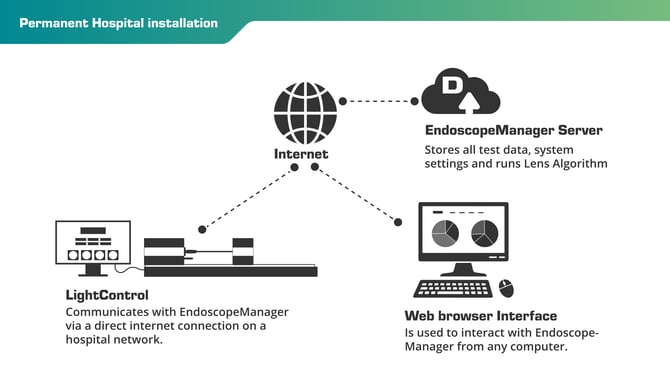
This is the most common setup for LightControl and EndoscopeManager. LightControl is set up in the CSSD with a permanent ethernet connection to the hospital network granting it access to the internet and EndoscopeManager. This is not plug and play as the hospital IT department needs to setup the network to allow LightControl to communicate. You can read what needs to be done in the IT Preparation Guide.
Mobile or Temporary 4G setup
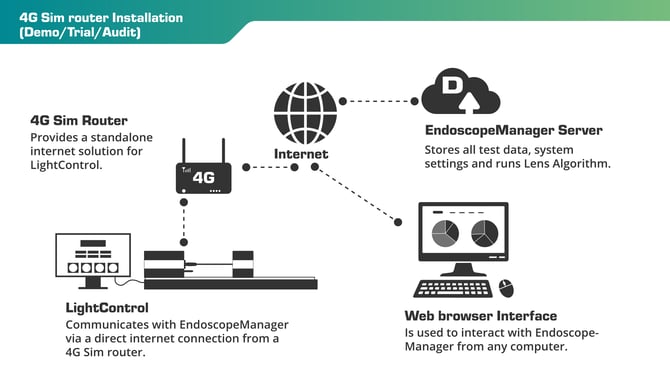
This configuration is often used for product demos, short trial installations or scope audits. Using a 4G sim router will allow you to provide an internet connection to LightControl. This setup is ideal for most short term situations, except for when used in areas without cell service like basements.
Mobile Laptop setup (MacOS/Linux)
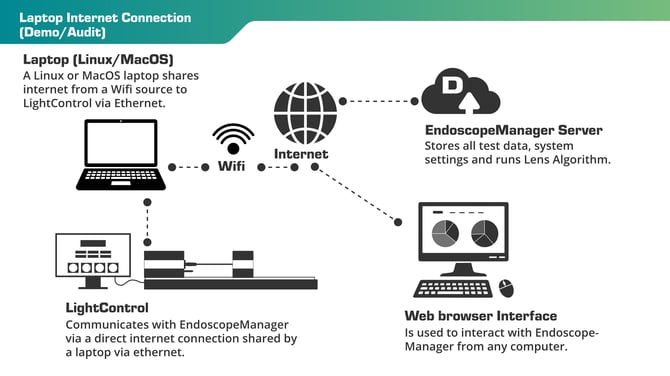
When you only need to run LightControl for 1 or 2 days at a site, and a 4G sim router isn't an option, connecting via a laptop is a great option. A laptop with an ethernet port, or ethernet adapter if the laptop does not have a native ethernet port, can share the internet connection it gets from wifi to LightControl via ethernet.
If you're going to be running a laptop setup, make sure to test it beforehand with LightControl by setting it up and running an endoscope test.
We recommend doing this with either a Linux or MacOS laptop. Though it is technically possible to do on a windows laptop, we have found it's simply not reliable enough to guarantee functionality every time.

